DigDB      Excel Add-ins      Add-in Tools for Excel Elites
Who else wants to do a 10-hour Excel analysis in 15 minutes? (more ...)

Features | Testimonial | Download free 15-day trial | Purchase | FAQ | Contact | Forum

Download DigDB Excel Add-in
    DigDB 7.1.3.3 supports Excel2000/2002/XP/2003/2007 (sorry, we do not support Excel97 or Mac.)

    What do I get?

      You get a FULL working version which will work for about 15 days. You can uninstall or buy a license at any time. After 15 days DigDB menu will be disabled.

    How to install?

      Download the above installer; exit all Excel; double-click the installer, run it through; at the end, Excel will start, and DigDB will load up. You will see a prompt to activate license. See screenshots of a typical install.

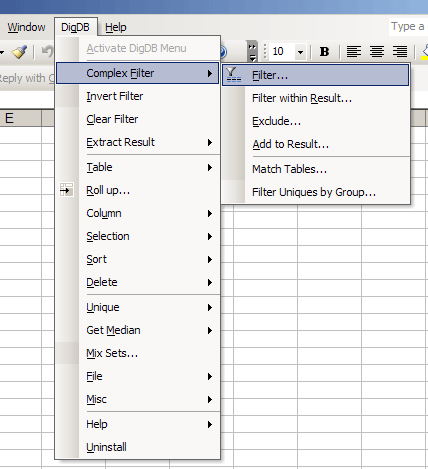
      After DigDB is successfully installed, and license activated, DigDB menu will become part of Excel and will automatically load up when Excel starts.See the screenshot next to the right.

      If nothing seems to happen after the install, or an error message pops up, or DigDB menu looks broken, please check against the FAQ page.

A Typical Install


Features | Testimonial | Download | Purchase | FAQ | Contact | Forum (powered by Nabble's free forum)

Copyright © 1999-2007 All rights reserved

DigDB      Excel Add-ins      Add-in Tools for Excel Elites
Who else wants to do a 10-hour Excel analysis in 15 minutes?

Related keywords: Advanced excel tips, excel questions tools, Excel reporting applications, Excel add-ins add-in, Excel shareware, Excel plugin plug-ins plugins, Excel tricks question, Excel utility utilities, Excel add-on add-ons, Excel tip tips, Power excel technique, Excel manipluation, Excel guru, Excel trick, Excel toolkit, Excel app power user

Microsoft Office Marketplace logo
Microsoft and the Office logo are trademarks or registered trademarks of
Microsoft Corporation in the United States and/or other countries.